

LMS Migration: What to Expect — A practical, end-to-end guide
Migrating a Learning Management System (LMS) is a strategic initiative for schools and organizations looking to improve online learning and streamline administration. This guide walks you step by step through the migration lifecycle phases, proven practices, common pitfalls, and the post-launch work that turns a new platform into everyday value. Knowing what to expect helps you reduce risk and get more from your investment.
Data gaps, user resistance, and surprise costs are the usual suspects that can stall a migration. Below we tackle those pain points with practical fixes: clear phase planning, data protection and validation, realistic budgeting, and the ongoing support needed to secure adoption and performance.
What are the key phases of an LMS migration?
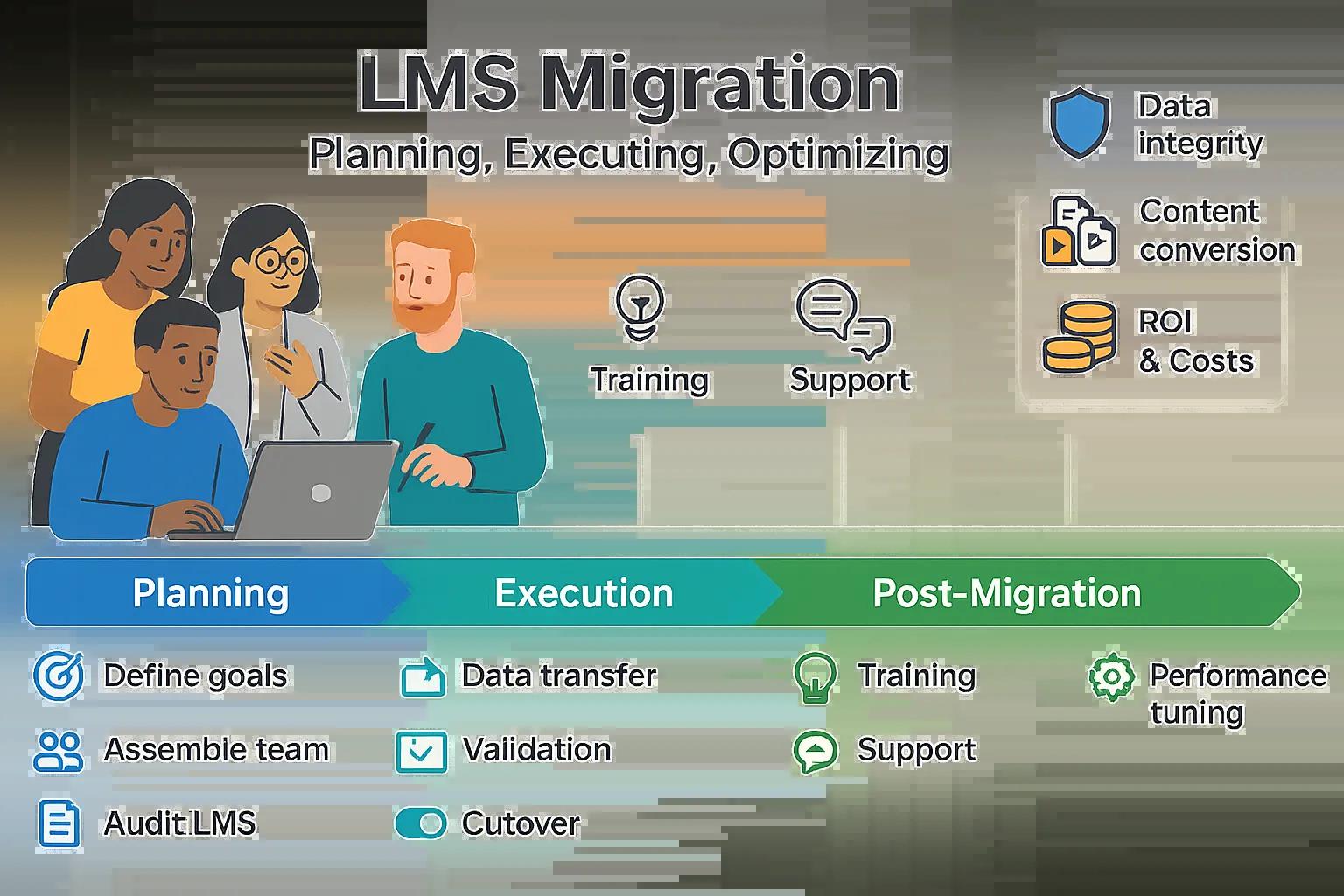
Most migrations break into three predictable phases: planning, execution, and post-migration. Each phase has distinct goals and deliverables to keep the project moving and controlled.
- Planning phase: Define success criteria, form a cross-functional migration team, and audit your current LMS. A roadmap with milestones and clear ownership prevents scope creep and surprises.
- Execution phase: Carry out the migration move content and users, run validation checks, and use cutover techniques that minimize downtime and disruption.
- Post-migration phase: Stabilize the platform with training, support, and iterative improvements so people can work confidently and leaders can measure impact.
How do you plan and prepare for LMS migration?
Preparation shapes how smoothly the technical work and user transition go. Key preparatory steps include:
- Define goals: Be specific improve learner experience, reduce administrative effort, or unlock better analytics. Clear goals make trade-offs straightforward.
- Assemble a team: Include IT, instructional designers, operations, and representative end users so decisions reflect real needs.
- Audit the current LMS: Inventory courses, user accounts, integrations, and customizations. Know what’s essential, what can be retired, and what needs conversion.
What steps are involved in executing the migration?

The execution phase is where your plan becomes action. Keep processes repeatable and checkpoints clear:
- Data transfer methods: Pick the approach bulk export/import, scripted ETL, or API-based sync based on data volume and complexity.
- Validation processes: Combine automated and manual checks to confirm data integrity, user access, and course functionality after each transfer.
- Cutover strategies: Use phased rollouts, pilot groups, or parallel-running environments to limit disruption and give teams time to adapt.
How can you ensure data integrity and follow best practices in LMS data migration?
Protecting and validating data is non-negotiable. Apply disciplined practices to keep records accurate and usable throughout the move.
- Data cleansing strategies: Remove duplicates, archive obsolete records, and standardize formats before migration clean source data reduces errors and shortens migration time.
- Mapping strategies: Create clear field-mapping templates that translate legacy fields into the new LMS schema, and document the business rules for conversions.
- Testing data integrity: Run test migrations and reconciliation reports to verify counts, enrollments, grades, and permissions match expectations after the move.
What are the essential data cleansing and mapping strategies?
Thorough cleansing and mapping reduce surprises. Focus on:
- Identify data sources: Catalog databases, CSV exports, third‑party integrations, and course files so nothing important is missed.
- Create mapping templates: Document how each legacy field maps to the new system this becomes the single source of truth for scripts and manual checks.
How do you handle content compatibility and conversion?
Content arrives in many formats; making it usable in the new LMS is both a technical and instructional task.
- Content formats: Audit file types (SCORM, xAPI, video, PDFs) and confirm which are supported natively or require conversion.
- Conversion tools: Use proven conversion tools or migration specialists for authoring packages and interactive content to preserve functionality and accessibility.
What common challenges occur during LMS migration and how can they be overcome?
Anticipate typical risks and put mitigations in place. Preparing for common trouble spots prevents last‑minute crises.
- Data loss: Mitigate risk with verified backups, dry-run migrations, and reconciliation checks before final cutover.
- User resistance: Engage users early, highlight benefits, and provide role-based training so adoption feels natural rather than imposed.
- Budget overruns: Build a realistic budget that includes discovery, remediation, conversions, and contingencies and track spend against milestones.
How to prevent data loss and manage downtime effectively?
Minimize interruption and protect records with practical safeguards:
- Backup strategies: Create full system backups and export critical datasets. Verify restores from those backups before proceeding.
- Downtime management: Schedule migration windows during low activity, communicate timelines clearly, and provide frequent status updates to stakeholders.
What strategies help overcome user resistance and budget overruns?
Effective change management blends training, communication, and tight financial control.
- User training: Deliver targeted workshops, quick‑start guides, and role-specific resources to build confidence and shorten the learning curve.
- Budget planning: Break the project into phases, estimate costs for each phase, and include a contingency reserve for unexpected technical work.
How do you plan LMS migration costs and measure return on investment?
Budgeting and ROI measurement help justify the migration and guide future investment decisions.
- Cost components: Include licensing, implementation, consulting, conversion work, training, and ongoing support when building your budget.
- ROI metrics: Track outcomes like faster onboarding, higher course completion, reduced admin time, and improved reporting to quantify benefits.
What are the typical cost components of an LMS migration?
Expect these core expense categories so you can plan accurately:
- Software costs: Platform licensing or subscription fees and any premium modules you need.
- Implementation costs: Time and services for configuration, integration, and any custom development.
- Training costs: Resources for admin and end‑user training, plus documentation and support materials.
How to demonstrate ROI and budget effectively for LMS migration?
Make ROI visible and defensible with clear measures and disciplined budgeting:
- ROI formulas: Use simple, measurable calculations time saved × hourly rate, improved completion × revenue impact to estimate returns.
- Budgeting tips: Review costs regularly, update forecasts after each phase, and be ready to reallocate funds based on early results.
What post-migration support and optimization should you expect?

Post-migration work turns a technical cutover into lasting adoption. Expect ongoing training, dependable support, and performance tuning so the LMS meets your goals.
- User training: Continued role-based training and refresher sessions help learners and admins get the most from the platform.
- Ongoing support: A reachable support model ticketing, SLAs, and knowledgeable staff keeps issues small and resolvable.
- Performance testing: Regular load and performance checks reveal scaling needs and keep the system responsive.
How to facilitate user training and adoption after migration?
Adoption programs should be practical and measurable:
- Training programs: Offer short lessons, live demos, and on-demand resources tailored to administrators, instructors, and learners.
- User feedback: Collect structured feedback and usage metrics, then iterate on support and training to close adoption gaps.
What are the best practices for ongoing maintenance and performance testing?
Keep momentum with disciplined maintenance and observability:
- Regular updates: Schedule maintenance windows for security patches and feature updates to keep the platform current and secure.
- Performance metrics: Monitor uptime, page load times, and completion trends to spot issues early and act quickly.
Why choose Markanyx Solutions for your LMS migration?
Markanyx Solutions delivers tailored LMS migrations for educational institutions and organizations. With over a decade working with Moodle and Totara, we handle migrations end to end from discovery through optimization so you can stay focused on learning outcomes.
- Moodle and Totara expertise: Our team configures, customizes, and extends Moodle and Totara to match your workflows and learning objectives.
- End-to-end support: We provide technical migration, training, and ongoing optimization to ensure the platform continues to deliver value.
What expertise does Markanyx offer in Moodle and Totara migration?
Our migration experience spans both technical and instructional needs:
- Customization capabilities: We tailor the platform’s appearance, workflows, and integrations so it aligns with your organization’s processes.
- Support services: Our support team resolves issues quickly and provides guidance for continuous improvement after launch.
How does Markanyx ensure security, multilingual support, and end-to-end assistance?
Security and accessibility are core to our approach:
- Data security: We apply industry best practices for data protection, secure transfers, and access controls throughout migration.
- Multilingual solutions: We support multi-language deployments and localization so diverse audiences can use the LMS comfortably.
| Phase | Task | Outcome |
|---|---|---|
| Planning | Set goals and assemble the team | A clear, actionable roadmap |
| Execution | Data transfer and validation | Migration completed with minimal downtime |
| Post-Migration | User training and ongoing support | Stronger adoption and user satisfaction |
Frequently asked questions
What are the key considerations for selecting a new LMS?
When selecting an LMS, prioritize user experience, scalability, and integration capabilities. Match needed features—reporting, mobile access, content standards—to your use cases, and evaluate vendor support, training resources, and track record. Involve stakeholders early so the chosen system reflects real workflows and expectations.
How can organizations prepare their users for the transition to a new LMS?
Prepare users with clear timelines, benefit-focused communications, and role-based training. Provide quick reference guides, FAQs, and hands-on sessions. Early pilots and beta groups surface issues and create advocates who support broader adoption.
What role does user feedback play in the LMS migration process?
User feedback is essential use surveys, pilot testing, and analytics to spot pain points and prioritize fixes. Feedback guides training, content tweaks, and UX improvements that boost satisfaction and adoption over time.
What are the best practices for ensuring a smooth cutover during migration?
To ensure a smooth cutover, pilot the migration with a subset of users, schedule the final cutover during low-usage windows, and communicate expectations clearly. Have a rollback plan and a validation checklist so issues can be addressed quickly if they arise.
How can organizations measure the success of their LMS migration?
Measure success with KPIs such as user engagement (logins, activity), course completion rates, support ticket volume, and time-to-proficiency for admins and instructors. Compare these metrics to pre-migration baselines to quantify impact and guide next steps.
What ongoing maintenance is required after LMS migration?
After migration, keep the system secure and performant with regular updates, security patches, and periodic performance tests. Maintain support and training programs, monitor user feedback, and plan iterative improvements based on usage data.
Conclusion
A well-planned LMS migration improves learning delivery, streamlines administration, and unlocks better data for decision-making. By following clear phases, prioritizing data integrity, managing change thoughtfully, and investing in post-launch support, you’ll maximize the value of your new platform. When you’re ready to move forward, Markanyx Solutions can guide your migration end-to-end (planning, data validation, configuration, testing, and go-live) so you can switch with confidence. Book a free assessment to review your current setup and migration goals and tell us a bit about your project so we can recommend the safest, fastest path.