

Onboarding warehouse associates effectively is crucial for operational efficiency and employee satisfaction. Utilizing Totara v20, a robust learning management system (LMS), can streamline this process through job task training and shift-based assignments. This article will guide you through the key features of Totara v20 that enhance warehouse onboarding, including how to configure shift-based assignments and design effective training modules. By addressing common challenges in warehouse training, such as inconsistent onboarding experiences and the need for tailored learning paths, we will explore practical solutions that leverage Totara’s capabilities. The following sections will cover the essential features of Totara v20, configuration steps for shift assignments, best practices for job task training, and methods to monitor training progress effectively.
The effectiveness of warehouse operations, including onboarding, is increasingly tied to well-designed systems and user-centred approaches.
Task-Centered Design for Web-Based Warehouse Systems
In the digital transformation era, web-based warehouse management systems play an essential role in ensuring operational efficiency, yet their effectiveness depends not only on functional accuracy but also on a user-centered interface design. This study aims to redesign the interface of Company XYZ’s warehouse management system using the Task-Centered System Design (TCSD) method within the Human-Computer Interaction (HCI) framework. TCSD emphasizes mapping real user tasks, analyzing user-centered requirements, prototyping through scenarios, and conducting usability evaluations.
Human Computer Interaction Design in Web Based Warehouse Management Systems Using the Task Centered System Design (TCSD) Method, 2025
What are the key features of Totara v20 for warehouse onboarding?
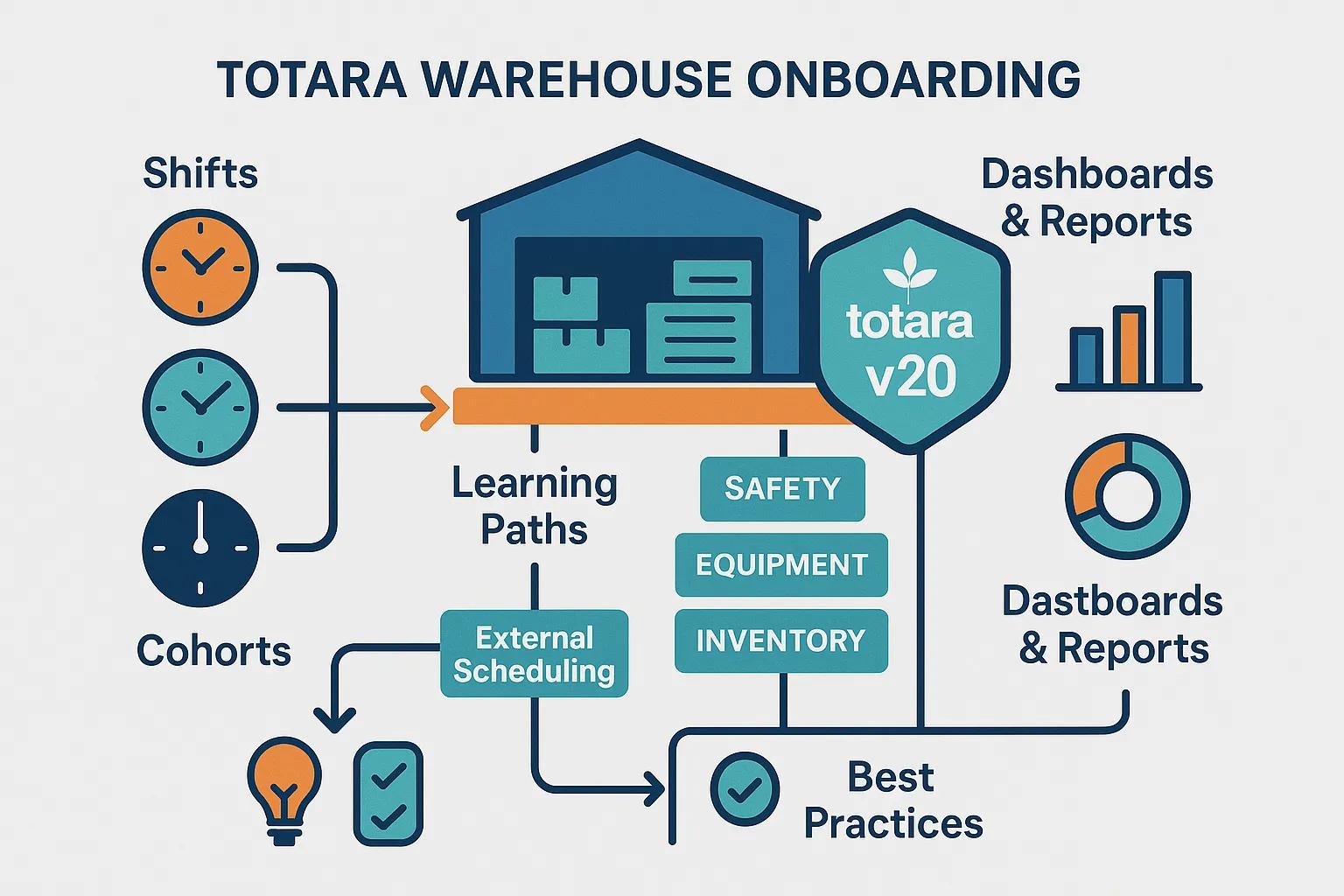
Totara v20 offers several key features that significantly enhance the onboarding process for warehouse associates. Its modular training capabilities allow organizations to create customized learning paths tailored to specific job roles, ensuring that each associate receives relevant training. Additionally, Totara does not natively include shift scheduling but can be integrated with third-party scheduling tools or custom plugins to enable alignment between training and work hours, facilitating a more organized onboarding experience. The user-friendly interface of Totara v20 further simplifies navigation for both trainers and trainees, making it easier to access training materials and track progress.
How does Totara support shift-based learning assignments?
Totara v20 supports shift-based learning assignments primarily through flexible learning path configurations and cohort management. While it lacks a built-in shift scheduling module, organizations can assign training modules based on shifts by integrating external scheduling systems or using cohorts and groupings within Totara. This allows warehouse associates to engage in training that aligns with their specific shifts, ensuring that learning occurs at optimal times. For instance, associates can complete training modules during their downtime or before their shifts, maximizing productivity and retention of information.
What job task training modules are available in Totara v20?
Totara v20 supports a variety of training modules but does not come with pre-built job task training content specifically for warehouse roles. Organizations need to create or import relevant content covering essential topics such as safety protocols, equipment handling, and inventory management. By offering a comprehensive overview of the skills required for different positions through customized or third-party content, Totara enables associates to be well-prepared for their responsibilities. The relevance of these modules to daily tasks enhances the learning experience and promotes better retention of information.
Understanding the specific competencies required for modern warehouse employees is vital when developing such tailored training content.
Required Competencies for Modern Warehouse Employees
Purpose: This paper analyzes modern-day warehouses and their employees to understand the required competencies needed to prevail and successfully work in a smart warehouse.
The modern-day warehouse employee: A study of augmented reality skills inside warehouses, 2020
How to configure shift-based assignments for warehouse associates in Totara v20?
Configuring shift-based assignments in Totara v20 involves setting up cohorts or groups that correspond to shift schedules and assigning learning paths accordingly. This process requires integration with external shift management systems or manual cohort assignments to ensure associates receive training aligned with their work schedules. This approach enhances the onboarding experience and improves overall training efficiency.
What are the steps to create and assign shifts in Totara LMS?
Totara LMS does not include a native shift management module. To manage shifts, organizations typically:
- Use external shift scheduling software that integrates with Totara or manages shifts separately.
- Create cohorts or groups within Totara representing different shifts.
- Assign appropriate training modules or learning paths to these cohorts.
This method ensures training alignment with shift-based schedules despite the lack of built-in shift management.
How to link shift schedules with job task training modules?
Linking shift schedules with job task training modules in Totara v20 typically involves:
- Integrating Training with Shift Cohorts: Assign specific training modules or learning plans to cohorts representing shifts, ensuring associates receive relevant training before or during their shifts.
- Utilizing Notifications: Set up automated notifications within Totara to remind associates of upcoming or overdue training sessions linked to their cohort or shift group, promoting accountability and engagement.
This integration enhances the learning experience and ensures that associates are adequately prepared for their roles.
How to design effective job task training modules for warehouse roles?
Designing effective job task training modules for warehouse roles requires a focus on best practices that align training with the specific needs of the workforce. By implementing these strategies, organizations can create impactful training experiences that drive performance.
What are the best practices for task-based learning in warehouses?
Best practices for task-based learning in warehouses include:
- Realistic Scenarios: Incorporate real-world scenarios that associates are likely to encounter in their roles, enhancing the relevance of the training.
- Interactive Learning: Utilize interactive elements such as quizzes and simulations to engage associates and reinforce learning.
- Feedback Mechanisms: Implement feedback mechanisms that allow associates to receive constructive input on their performance, fostering continuous improvement.
These practices ensure that training is not only informative but also engaging, leading to better retention and application of skills.
These practical approaches are often rooted in established learning theories that emphasize active engagement and real-world application.
Applying Task-Based Learning Theories for Training
ABSTRACT: This assignment evaluates theoretical perspectives in teaching, learning, and assessment practises; based on two lesson observations, A and B, delivered by a teacher in the ESOL Entry 2 subject. I will use learning theories to evaluate the teaching and learning strategies used in both lessons: behaviourism, cognitivism, social constructivism, and humanist approaches. Using these theories in the learning process allows teachers to improve their
Task-based learning applied, J Molinari, 2012
How to align training modules with employee roles and shifts?
Aligning training modules with employee roles and shifts involves:
- Role-Specific Content: Develop training content that is tailored to the specific responsibilities of each role within the warehouse.
- Flexible Scheduling: Allow associates to complete training modules at times that fit their schedules, ensuring that learning does not interfere with work commitments.
This alignment promotes a more effective onboarding process, as associates are better prepared to meet the demands of their roles.
How to monitor and report training progress by shift in Totara v20?
Monitoring and reporting training progress by shift in Totara v20 requires using cohort or group filters to segment data by shifts. Totara provides several tools that facilitate this process.
What tools does Totara provide for training completion tracking?
Totara offers various tools for tracking training completion, including:
- Dashboard Analytics: Visual dashboards that display training progress metrics for each associate, allowing managers to quickly assess completion rates.
- Automated Reports: The ability to generate automated reports that summarize training completion filtered by cohorts or groups, which can represent shifts, providing insights into overall training effectiveness.
These tools enable organizations to maintain oversight of training progress and identify areas for improvement.
How to generate shift-based training compliance reports?
Generating shift-based training compliance reports in Totara v20 involves:
- Accessing the Reporting Module: Navigate to the reporting section within the Totara LMS.
- Selecting Compliance Metrics: Choose the specific compliance metrics to be included in the report, such as completion rates and assessment scores.
- Filtering by Cohort/Group: Set parameters to filter the report by cohorts or groups that correspond to shifts, allowing for a detailed analysis of training compliance across different shifts.
This process ensures that organizations can effectively monitor training compliance and make data-driven decisions to enhance their onboarding processes.
What are the best practices and case studies for warehouse onboarding with Totara v20?
Implementing best practices in warehouse onboarding using Totara v20 can lead to significant improvements in efficiency and employee satisfaction. By examining successful case studies, organizations can gain insights into effective strategies.
How have companies improved onboarding efficiency using Totara?
Companies that have adopted Totara v20 for onboarding have reported improvements in efficiency through:
- Streamlined Processes: The modular training approach allows for quicker onboarding, as associates can complete training at their own pace.
- Enhanced Engagement: Interactive training modules have led to higher engagement levels among associates, resulting in better retention of information.
These improvements demonstrate the effectiveness of Totara v20 in enhancing the onboarding experience for warehouse associates.
What industry trends influence warehouse training and shift scheduling?
Current industry trends influencing warehouse training and shift scheduling include:
- Increased Automation: The rise of automation in warehouses necessitates ongoing training to ensure associates are equipped to work alongside new technologies.
- Flexible Work Arrangements: As more companies adopt flexible work schedules, training programs must adapt to accommodate varying shift patterns.
By staying informed about these trends, organizations can ensure that their training programs remain relevant and effective in meeting the needs of their workforce.
Conclusion
Effectively onboarding warehouse associates with Totara v20 boosts operational efficiency and employee satisfaction through tailored training and shift-based assignments. With Totara’s modular capabilities, you can build role-specific learning paths that prepare associates faster, standardize safety and SOP training, and keep progress visible for supervisors and HR. When onboarding aligns with real shift schedules, training feels practical, reduces ramp-up time, and helps improve retention and performance from day one.
Ready to modernize warehouse onboarding with Totara v20? Book a demo with Markanyx, official Totara partner, and see how we can configure shift-based assignments, role-based learning paths, and reporting that matches your operations.